


Right now you have to mark the start of video recording and then save.
Often I kind of want to save the last several seconds of footage. Sort of like a replay.
It would be great if it was always recording and I could just dump the last several seconds.


 6 comments






Hi, for a game I'm working on, you can choose between two characters. But I dont have enough space to store the two characters in the same cart. I was thinking about releasing two carts, each one with a character.
The issue is that a given thread in the BBS only show the most recent cart in the "splore" of Pico 8.
Do I need to make two separate threads then ? Or is there a way to show or choose what cart is shown in splore ?
I could also try a multiple cartridge thing, like with a main cart with a selection menu, and two cart for the characters. But I dont think it work in web player or in splore. You would need to download the 3 carts manualy.
Is there a better idea than two separate threads ?
4 comments



I am seeing some strange things using Pico8 on my Raspberry Pi 3.
When using the code editor I notice that random text will "leak" through to applications outside of Pico8. I had my IRC client open and when I was done working with Pico I noticed I had spammed 3 of my open IRC channels with random code from my Pico8 program.
I also noticed that a bunch of random applications were open as well that were not before I started using Pico8.
I am using Raspbian Jesse. I may try a different distro and see if I get the same results.
Can anyone shed any light on what is going on here?
Thanks
0 comments



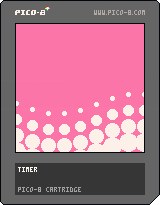
Accidentally found a fun wavy transition effect while screwing around with math.
I added nice comments to the source. Try pulling it down and tweaking the values to see if you can make it even cuter-looking.
--timer t=0 function _update() --increase timer t+=0.05 end function _draw() cls() --this crazy bit loops through --limited background colors, --and changes it when the --screen is covered with white local c = 12 + ((t-2.55)/4)%4 rectfill(0,0,128,128,c) for i=0,8 do -- column loop for j=0,8 do -- row loop --x positions are snapped --to 16px columns local x = i*16 --this number sweeps back --and forth from -1 to 1 local osc1 = sin(t+i*0.1) --this number also sweeps --back and forth, but at --a different rate local osc2 = sin(t/4+j*0.03) --y positions are influenced --by one of the sweepy --numbers local y = j*16 + osc1*10 --the circles' radii are --influenced by the other --sweepy number circfill(x, y, osc2*15, 7) end end end |
2 comments

Menu opens when I press key that i have mapped to left cursor?
Here I am using software to map some extra buttons on my controller to left cursor and right cursor.
But I have also had this happen when not using my controller.
See this video.
Seems that if there are two controls happening at for the same key it fires both rather than only one. Hmm.
1 comment

Hi,
I'm using coroutines very successfully in my battle system. The only drawback now is, that coroutines don't stop the game, nor do they throw or show any errors. This is very, very unpleasant, as I'm having some of my core logic in there. If there is an error, the game simply stops, because it expects a result in a table. I don't have any hint what went wrong in that case and debugging this takes a lot of frustrating time - any chance to fix that?
8 comments



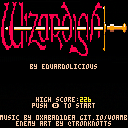
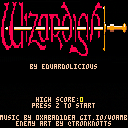
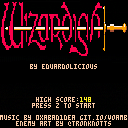


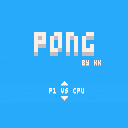
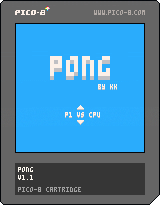

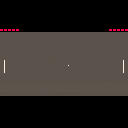
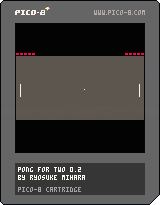
2-player Pong game. I made this so that it can be enjoyable on Pocket CHIP.
Controls
[Left Player]
arrow up / arrow down
[Right Player]
z/x
or
e/d (P2: arrow up / arrow down)
Updates
v.0.2
- Modified paddle length and ball speed
- Added screen shake
Older Carts
 1 comment










I do not have Flash installed, and Adobe are recommending people uninstall it as it is now officially dead.
So, could the YouTube embeds please use the HTML5 method?
http://www.htmlgoodies.com/html5/other/theres-more-than-one-way-to-play-embedded-youtube-videos.html
--youtube
3 comments

The bugs:
- The pink status bar in the sprite editor is a pixel smaller in "full screen" (tab button) mode. You can also see this if you press F6 to take a screenshot in that mode, which will briefly make the status bar a pixel bigger again just to alert you of the saved screenshot. Maybe the editing area could be pushed up a pixel and a gray line added above the status bar so it matches the layout of the map editor.
- For some reason, on new projects SFX 00 has SPD set to 01 but all the other SFX have SPD set to 16. Not sure if this a bug or intentional, but it's still a strange but annoying inconsistency.
- In graph mode on the SFX editor, you can't choose a C note in octave 0, as the lowest it lets you click is C# in octave 0.
- In tracker mode, only the C note in octave 5 can be accessed without manually changing the octave number. 9, O, and 0 could be mapped to C#, D, and D# (respectively) in the higher octave. An E note should also be added to octave 5 and the E note of the higher octave should then be mapped to P to make the keyboard mappings feel more complete. Besides, it'd feel strange just having the right-most mapped key on the top rows of keys being mapped to a sharp note.
1 comment

Is it possible, to modify the speed of the (keyboard) cursor if you hold one key down.? I think it is too slow and I want to tweak it, to let the cursor move at a higher speed. This might be something for the config.txt.
9 comments



Since P8 has a 32k limit on numbers, what's the best way (or a way) to have numbers in the 100 thousands or millions and so on?
I mean, I guess I could super fake it by just printing out zeros after a low score integer but is that really the best way to deal with it?
30 comments






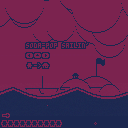
Oh no! There's been a disaster, and your crew has gotten lost at sea. Luckily, you've got a supremely buoyant sailboat: it's up to you to pick them up and tow them back to safety!
Controls:
-Arrows for movement
-Z to toggle UI
-X to swap palettes
I went with some extra self-imposed challenges on this one:
-1-bit colour
-No text
-No assets (i.e. sprites, tiles, sounds, or music)
Made for #simplejam.
3 comments


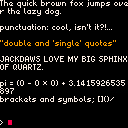
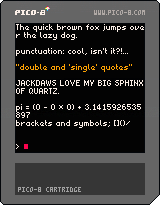
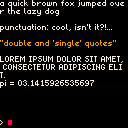
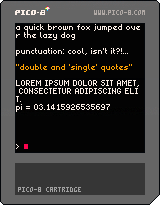
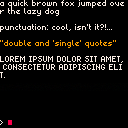
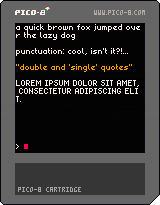
This is a set of sprites and functions that allow the user to draw text with a proportional font. The font covers upper and lowercase, digits and basic punctuation. This set is not as compact as the others right now, demanding 16 sprites, but it provides, IMO, more readable characters.
current version:
- switched from using the bottom 16 sprites in the first page to a 4x4 area in the first page
- restored all characters to their intended designs
old versions:
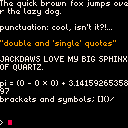
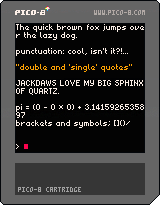
 3 comments



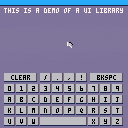
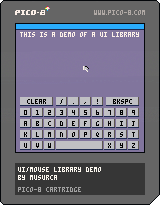
UPDATE: (0.2) Updated the mouse library so that the cursor can be driven by the gamepad OR the mouse at any time, to make the cart compatible with all Pico-8 devices.
I'm cobbling together a UI/mouse library for my own use, and thought it might be useful to others. For now the only widget is a button, but I wrote the API so that it's easy to modify and extend (in theory). Will provide more documentation if there's interest.
This would be a quick "hello world" with the library, for instance:
--button "onclick" callback function hideme(this) this.visible=false end function _init() --enable the mouse and --set the cursor to a 6x6 sprite --at index 0 mouse_init(0,6,6) --create a new parent UI and --make it the active one mainui = ui_make() ui_setactive(mainui) --make a button labeled "hello, world!" --which calls hideme() when clicked. --It will draw at screen position (30,30). --I could also optionally specify a width and height, --but if I leave it out the button will be sized automatically --based on the length of the label text. btn_make(mainui, "hello, world!", hideme, 30, 30) end function _update() --update mouse position and do event callbacks --as needed mouse_update() end function _draw() cls() --print mouse position print(mouse.x.." "..mouse.y,0,0,7) -- draw mouse on top of UI ui_draw() mouse_draw() end |
6 comments


As I already says in a topic in the Pico8 forum, I'm going to make a Pico-8 stand for a French retro-gaming convention during Fall (at least this one, but I hope to be able to deploy my stand in more locations!)
My goal with this stand is to allow people to discover Pico-8 and I will also run a simple jam for the interested people.
The stand will be made from Raspberry Pi (I have a few of them) connected to CRT monitors (or whatever is available) potentially two CHIP as soon as there is the update that include Pico-8 also connected on CRT or other screen, depending on the availability (hopefully the people that organise that even can lend monitors, that's really handy! :D) and my Picade with a rPi3.
Basically all of the Pi/CHIP will be connected together on a private network (I want this stand to be autonomous, because some convention can't provide an internet access, so I want them to be able to run without an internet access.
So on that network, either a computer, or one of the "Pico computer" will also have an offline BBS that will allow splore to work as if it were online.
I've found how the BBS is working and it's not really hard to make it work using DNS spoofing, but I really hope that ZEP will provide at some point a way to have our own offline BBS (at least an option in the config file to change the BBS address for such uses)
The best would also to directly submit a cart from Pico-8 that would be marvellous, but I may ask too much there :)
Anyway, all the Pi (and I will see for the CHIPs) will run a specialised version of Linux that boot directly into Pico-8 and will provide a way to upload cart to the offline BBS, need to check for that.
Anyway, I'm going back to the original goal of this blog entry.
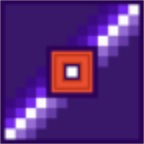
There is something that all good stand need: a stunning logo, and the Pico-8 logo is a really stunning one because it's blocky and colourful! And how to make it even better? make it shine in the dark using LEDs.
I've been working on that for a few weeks now, and I've finally done the mechanical part, as I have access to a laser cutter, I had great fun today with it, and cut what will be the shiniest Pico-8 logo!
0 comments

Hey all, me and a friend have been talking about the possibilities of being able to split a pico script into multiple files and compile them as they're edited for a while, so here is a python script that'll let you do that, hopefully it works well.
https://github.com/ambocclusion/pico-8-compiler
Let me know what you think!
Also if you plan on using it, back up frequently or use version control as it might end up wiping your file more than once because it's super destructive!!!!
7 comments
