On Linux this code does not trigger the out of memory handler, or triggers it too late (when PICO-8 has already allocated 3 gigabytes of memory), causing a crash.
s,n="x",0
::lol::
print("2^"..n.." "..stat(0))
s,n=s..s,n+1
goto lol
|


 0 comments

So, I've been fiddling with my Picade and Emulation Station setup to get it playing PICO-8... mostly because I thought I'd configured it wrong. But just earlier, I exited ES and tried to launch PICO-8 on the command line... also to no avail. I'm not really sure what's up with that - it's in a subdir that has RWX privileges recursed to it and everything.
Using the Pi 3 B.
Also... is there a "pico8.sh" I should be looking for, somewhere? Because it isn't there. Or at least, I can't find it. I'm just in the typical ".lexaloffle/pico-8/" directory. I've tried coupling it with p8 files and the -splore modifiers too, same deal. The screen blinks like it TRIES to launch it, and then reverts immediately.
5 comments


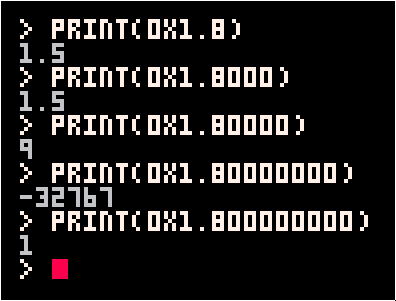
When a hex float is written with more than 4 digits after the comma, these digits cause the mantissa to spill over the characteristic in the final number:
 0 comments


Customizable Connect 4 for 2-8 players!
Rules:
Players take turns at dropping chips into the grid. The first player to have the required amount of chips of his color in a horizontal, vertical or diagonal sequence wins the match.
Try fiddling with the options to alter the game!
2 comments



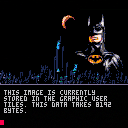
Instrux are included in the main program.
Now that I have a way to compress my game logo, I'll go to work on that Halloween game I promised. :)
19 comments





In trying to optimize my code, I was working on this:
cls() a=254 c=0 b=band(a,2^c) print(b) |
Results are: 0, which is correct. There are no #1 (zero) bits in the number 254.
Now try this:
cls() a=254 c=0 b=sgn(band(a,2^c)) print(b) |
The result is: 1, which is INCORRECT. There are no #1 (zero) bits in the number 254.
With problems like these, it's no wonder we're constantly fighting code - as in this case - it's not my fault for this particular calculation coming up wrong.
2 comments

I can see how to have a string linked to another thus:
cls() a=[[apple juice]] print(a) |
apple
juice
However, how do you link a string to another on 2-lines that does not put a CR (#10) inside the text between code lines ?
cls() print[[apple;; juice]]) |
applejuice
How do you do it ?
2 comments

Every programmer worth their salt knows the difference between LOCAL and GLOBAL variables.

But I was wondering, what if you could reverse that ?
That is, when you define a function, you have the option of saying GLOBAL in there, either to define a global variable, or just to make a flag change.
Because by doing so ANY variables at that point which are not issued as GLOBAL automatically default to LOCAL.
For programs that do not use too many global variables, this might be an easier way to code as you would not have to assign each and every local variable for each and every function.
Thoughts ?
2 comments

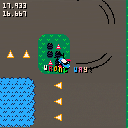
Hey everybody, this is my first game in PICO-8. A 2D racer in the vein of Super Off Road or Skidmarks developed in under a week. Your goal is to be fastest you can be. To help you achieve that you have a timer and ghost car racing alongside you.
Accelerate with up. Decelerate/reverse with down. Turn with left and right. That's all there is to it. The moment you drive over the checkerboard, the race starts.
It's got plenty of problems and bugs:
-audio sucks. I can't do audio. it's like programmer's graphics, only worse. fortunately you can turn it off.
-art. my drawing sucks. I also didn't have enough place to create 8 more 16x16 car sprites, so the rotation looks choppy
-if you stay on one lap for too long the game will run out of memory, as it is always recording :D
13 comments








|
[8x8] |
Well guys, if I can pull you from your projects for just a short moment. I =WOULD= like to wish each and every one of you a very safe and Happy Halloween.
http://www.writerscafe.org/writing/dw817/1838331/
I =WILL= be writing a Halloween themed game in PICO-8 based on an old Apple ][ classic. How about you, are you going to write any Halloween or Haunted House themed games this holiday season for others to try out and enjoy ?
2 comments
code:
- hitting del on very first character does nothing.
- selecting some text at the very end then hitting del deletes the text, as it should. but hitting del one or two more times brings some of the deleted text back
- ctrl-z is annoying most of the time as it often brings you too far back (nicknamed ctrl-y 'ctrl-whyyy?')
- maybe 'tokens ####/8192' or 'chars #####/65536' would be clearer (at a glance as for newbies)
- a few syntax highlighting issues I've reported in dedicated threads
sprites:
- the reticle does not change according to the selected tool (I keep having unwanted fills for instance).
- shouldn't the selected area define a clipped working zone ? only the fill bucket works like that, other tools and ctrl-v do not.
- you can draw your selection past the editor window, which is nice, but there's no feedback. pan the window?
map:
- no ctrl-v, you have to use the stamp tool.
- same as above about limiting actions to the selected zone. only fill bucket works.
- the selection frame disappears when you draw it beyond the edit window
- I find the ninth row a little confusing at times. you can edit it while only seeing half of it. limit to 8 ?
sfx:
- no copy/paste between instances of pico-8. copy/pasting on the bbs would be a nice addition too.
- i'm only doodling in there, maybe a few technical cues could help ? like showing the frequency/tune of the note you're editing in pitch mode. from the manual I was under the impression that you could freely change frequencies whereas holding ctrl would snap in tune. from the tool it seems the note is always in tune and ctrl snaps you on two pixels instead of one (D snaps to D#, C# to C..) ?
tracker:
- I'm not using it, for some reason :p
- I guess some external copy/pasting would be nice there too.
- have a piano keyboard, musical staves ? yeah, I'm -mostly- joking. I don't know solfege anyway ;)
4 comments


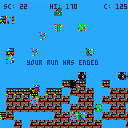
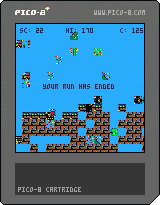
Basically Super Pico Runner Bros, but it corrupts and keeps corrupting faster.
For a real challenge, locate where I increment "C" and make it so it increments by "flr(rnd(6))". Game becomes literally unplayable
2 comments


 10 comments

v0.1.9b
From a blank cart, enter into the editor:
A={
|
and RUN. This gives:
> RUN
SYNTAX ERROR LINE 1
A={
'}' EXPECTED (TO CLOSE '{' AT LI
NE 5.341E-05) NEAR 'IF'
>
|
(5.341E-05 is presumably the string representation of the integer line number 0x00000001 as interpreted in 16:16 fixed point)
2 comments

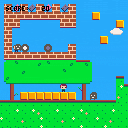
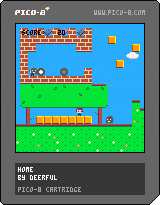
A mini platform game, which goes alongside my forthcoming 8-bit EP, Home (https://wiaiwya.bandcamp.com/album/home-ep), and is also available with some extra content on a special limited-edition USB drive. Help Emma collect the tapes and records, and get home safely - and look out for John Jervis of label WIAIWYA, who released the Home EP. Features some exceptionally lo-fi versions of the songs from the EP as its soundtrack.
Home was based on Jelpi, by Zep.
2 comments


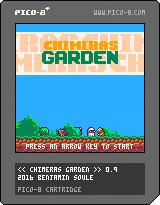
This is the game I'm working on right now.
It's a pokemon-like game. You start with one chimera and must convert new chimeras by fighting them.
- Move/Swap your chimeras, talk and grab stuff with arrow keys. Fights are automatics.
- When you defeat a group of chimeras they turn green and you can convert one of them.
- Your starting group size is only one but you can improve it by collecting rods of obedience.
- Your surviving chimeras wont replenish health or mana. You need to find apples to do this.
The map is not really balanced right now but the game is somehow playable. So I would be interested to know at this point how much chimeras you can defeat.
If you can defeat all 160 nothing will happen, because I didnt implement any ending right now.
Have fun !
8 comments





Would be really cool, then we could create our own cart tools to simplify development (a la scratch) for people who want to make a quick snappy game without much work, or create devtools that include stuff like shaders, etc. (a la game engines)
Example:
save(filename,data) |
Also EDIT: I remember seeing a post that could read all keyboard inputs, but I don't remember exactly where it was or how they did it, it involved peeking and poking though. Would be useful to have functions like KGET() to get a keyboard key for devtools.
7 comments
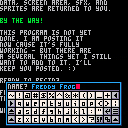
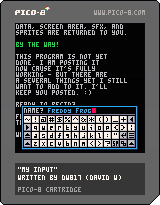
Welcome to another useful utility from the lab of dw817. (ME !)
This particular one is a full UPPERCASE and lowercase keyboard. that's right, your strings are indeed saved in lowercase if you select that from the keyboard.
You can use the mouse, touch-screen, or even the arrow keys and (z) (x) to add and remove letters.
What is especially useful about this particular keyboard is that it saves everything prior to being called. And that includes the graphic area it appears at. Any sound effects as it has its own. And even a custom sprite mouse cursor.
All your files are saved in memory first before the keyboard is available (and it's really fast so you won't notice it doing it). :)
In exiting, all your data, screen area, SFX, and sprites are returned back to you.
BY THE WAY !
17 comments