Greetings.
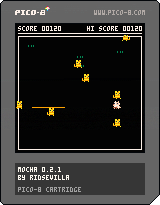
I have gotten trouble in coding a part of my game. The core gameplay is that a dragon goes through a randomly-generated dungeon, finds a treasure, and goes back to the start. The problem is that I had trouble knowing just how to place the dragon and the treasure. The idea is that the dragon would have to travel a considerable distance before finding the treasure, which is located at a "dead end". The code I used in the dungeon generation is here: http://www.dangerousru.in/p8/p8gen.html
I appreciate any help I get here.


 4 comments


Hi,
The other thread about converting numbers to hex strings got me wondering if it was possible to do the same with fixed point data. (I did try searching here first but didn't find anything about this specifically)
I wrote a quick test to dump the bits out, but for floats I'm not sure where to find the fractional part. I figured it'd be in the top byte, but as the last test shows, it's not there (or my code is wrong). Is it possible to get at this data?
Thanks
function convert(value)
  local binary = ""
  for i=1,16 do
    local shift = shl(1,i-1)
    binary=abs(shr(band(shift,value),i-1))..binary
  end
  print("convert "..value.." to binary:")
  print(binary)

  local integerval = 0
  for k=1,16 do
    local str = shl(sub(binary, k, k),16-k)
    integerval += str
  end
  print("and back again: "..integerval)
  print("")
end

function _init()
  cls()
  convert(0xc0de)
  convert(12345)
  convert(3.14159)
end
|
4 comments


I'm trying to make a platformer that just uses pixel colors as a way to check for the ground/walls of a level, no sprite flags. At first it seems to work, the guy (stick) moves left/right and jumps on the initial ground just fine. But then when you jump up on the platform to the right and either walk or jump off back to the left, he sinks into the ground.

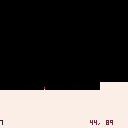
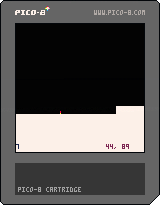
See code below, but what I'm doing is checking the pixel immediately below the stick to see if it's a ground color and if so, stop applying the gravity. Seems simple enough...made sense to me but I'm clearly missing something.
I'm happy with the jumping action, it's nice and smooth and such but landing seems to be an issue. If anyone has suggestions for my code or just insight in general, I appreciate it. Making a platformer is new to me...I usually make shmup games :)
NOTE: Code as-is is not checking for left/right collisions, just ground for jumping.
11 comments

Hi everyone! I'm mostly an old school gamer, which is why I'm glad I ran across the PICO-8 the other week and I've been having a bit of fun with it. A pretty cool concept that many people are pouring their hearts and souls into. Hopefully I can do the same eventually, but not being a tech person, I doubt I could do anything other than a demo (if I'm even that lucky!), much less an entire game. Yeah I know, there's tutorials and all, but those are too impossible to try to dive into with a rare illness that causes chronic fatigue when you're trying to concentrate and then you get interrupted by having to nap. Only two more surgeries to go before I'm normal again (whatever that means :P ), but I don't have the money for them right now, so we'll just have to see one day.
Anyway, here's some gaming stuff about myself:
Platforms/systems I own
Atari 7800 (with a few dozen 2600 carts)
Vectrex (hence my user name!)
Sega Genesis
Sega CD
Sega 32X
Some handhelds
Some PC games
Plug and play unit
*Chromebook (some stuff is exclusive to it but I mostly use it for internet gaming)
The family also has a Wii, Ipad Mini and a crappy Android device that I also game on but they're not mine.
And last but not least, some [b]gaming stuff I've founded as well
2 comments


Lua's standard library has a pair of handy functions called "tonumber()" and "tostring()", but they don't seem to be present with Pico8, which is unfortunate. I realized that you can get a lot more storage space by using strings, rather than sprite byte encoding, but passing it back into usable number data is challenging.
At best, I've got this so far:
function str2hex(str)

  local dd={}
  dd["0"] =  0 dd["1"] =  1
  dd["2"] =  2 dd["3"] =  3
  dd["4"] =  4 dd["5"] =  5
  dd["6"] =  6 dd["7"] =  7

  dd["8"] =  8 dd["9"] =  9
  dd["a"] = 10 dd["b"] = 11
  dd["c"] = 12 dd["d"] = 13
  dd["e"] = 14 dd["f"] = 15

  local obj={}
  for i=1,#str do
    obj[i]=dd[sub(str,i,i)]
  end

  return obj

end
|
14 comments


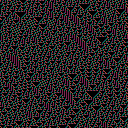
I've made a simple Cellular Automata generator as my first PICO 8 cart.
You can change the generation rule by modifying the rule variable at the beginning of the code.
More details about Cellular Automata can be found here
Any comments are welcome.
0 comments
Working on a little demake of MinerVGA.
Currently sitting at 15 ore types, 488 tokens, and 1 sprite page used. Most of the ores are loaded via peek() at sprite data. I want to keep it to one sprite page and 0 map pages, but we'll see how much I get done.

 5 comments


I was using btnp() to fire bullets (and arrow keys for movement) but noticed that no bullets would be fired when I changed directions. The documentation claims "btnp() also returns true every 4 frames after the button is held for 15 frames." but it looks like it only returns true if no other keys changed state for 15 frames. For example, if you hold down Z and press left and right alternately you won't see btnp(4) be true.
(Incidentally, the long delay before repeat made btnp() a bad choice for my game anyway, but you do see it used in sample code, e.g. the DOM8VERSE tutorial in zine 3.)
test code
12 comments





Hey guys thought I would post this here as I think the answer will help other too:)
Basically I want to make a function that approaches any number in as big chunks as possible. Like this:
Speed = approach (target number, amount to move by)
So speed = approach(0, 0.5)
If speed was 0.4 before I want it to hit 0 and not -0.1
So if speed was a higher number like 7 every frame till it hits the target 0 it would take 0.5
Really useful for making velocity and stuff feel good :)
Any help very much appreciated :)
13 comments

A fun little toy/demo displaying some maze algorithms.
Note the mazes generated are perfect mazes, meaning they have exactly one path from any point to any other point inside the maze. They're not so useful for making games without some adaptation.
Algorithms:
Binary tree: at each cell, decides to go either down or right. Produces a bias towards diagonal movement and obvious lines at the bottom/right.
Sidewinder: goes along a run of cells horizontally, then adds one passage downwards. Tends towards vertical movement and obvious line at the bottom.
Aldous-Broder: random walk filling in cells as they're visited. Produces a totally unbiased maze (assuming rnd() is unbiased) but can be slow at the end.
If you're interested in the topic I recommend this book (that I got the idea/algorithms from): Mazes for Programmers.
4 comments




Hey all,
Perhaps you can help me here. I am writing about "fantasy consoles" and I am trying to give some sort of formal distinction between the concept of "fantasy console" and a"virtual machine". Any input?
15 comments






2 Worms based on .... https://twitter.com/lexaloffle/status/742109814663176192
I am looking for ideas to make this into a game
Any Suggestions?
0 comments
I see % all over and have even copied it but have no idea what it means or does...
For example:
local b=13 local a=flr(b/2)%2 |
I know this is like beginner stuff. The manual says "Same as (x%1) for positive values of x" under the flr() documentation but the % isn't the same as flr() is it?
And then why is it used?
3 comments

So I've been playing around with PICO-8 for a few weeks now (I've got an Ultima I style game in progress, but that's slow going!). As part of that development, though, I've been putting together a framework based on the old XNA system of game components and the screen manager demo that was part of the XNA demos.
I decided to put together a simple video poker game to demonstrate/test/troubleshoot the framework, and this is the result of a few hours of playing around.
The idea is that there is are a handful of useful components that can be used to perform various utility functions (button handling, timer, etc) as well as a component called the screenhandler.
The screenhandler's job is to manage game screen objects that compartmentalize any aspect of the game that the user interacts with directly.
Basically, this means that instead of tracking game states throughout the code, I can create self-contained screens and pop them onto the screenhandler's stack. It controls what gets displayed and where input gets directed.
Screens can choose to be drawn (or not) when another screen is above them in the stack. The example here is that when the player pops up the betting window to alter the amount they are betting on a hand, the poker screen is still displayed behind it, even though it is not accepting any input from the player.
I'm using movAX13h's P8Coder, and you can download the .P8C file for the game from my blog at http://www.twentysidedblog.com/pico-poker/
2 comments



Working on a small desert survival simulation game; you get placed in to a procedurally generated desert and have to find water to survive, and find civilization. But beware, there are mirages!
This is my first game, and still under development/refactor as I wrap my head around the API
- Added thirst bar (find water in 30 seconds or die*)
-
Mirages and Oases (25% chance of finding a mirage)
- Death not implemented
2 comments

(Deleted previous thread b/c it didn't contain the cartridge. ¯_(ツ)_/¯)
Hey Everybody, just thought I'd share with all of you my first real project in awhile.
Currently, it's just a prototype, but I plan on improving graphics (right now, blocks), sound (non-existent), and gameplay (basic). The game will be set aboard a spaceship, where you will have to fend off a legion of monsters/aliens/demons (no decision yet :/) with only your bare fists and some sort of gun.
As you can tell, I have yet to plan most of the game out, but hey, what do you expect from a prototype?
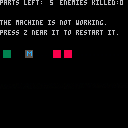
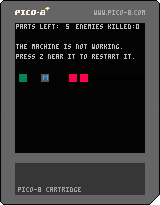
Anywho, let's discuss mechanics. The machine (Gray block with "M" on it) must be fully functional in order for you (the green block) to attack enemies (the red blocks). Problem is, the machine has a tendency to break down. A lot. So, when it does break down, you will need 5 parts in order to repair it. How do you obtain these parts you may ask? Well, I'm so glad I asked. Remember the monsters/aliens/demons I mentioned earlier? They have parts. And, since they're not giving any away, you have to take the parts. Right from their cold, dead hands. That's right. Kill the monsters, get more parts, repair the machine. Repeat until dead/bored/eatenbyagrue.
That's about it. Enjoy!
Controls
Up Arrow - Jump
Side Arrows - Move Left/Right
Z Key - Repair the machine
X Key - Attack enemies (currently melee only, srry :(( )
[/#23329#]
0 comments

I decided to do a write-up of a little recursive algorithm I made for finding every configuration of a set of blocks in a line. While I was doing that I figured I might as well make a PICO-8 cartridge and do a little rendering.
Left and right to change the rendering size, up and down to scroll. To change the number and size of the blocks, the size of the line and the minimum number of spaces between blocks just change the appropriate values in _init().
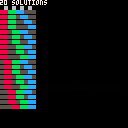
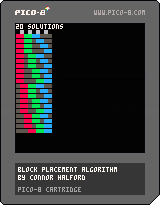
Algorithm (full code in cartridge)
[hidden]
function block_char(block_id)
  local chars = "abcdefghij"
  return sub(chars, block_id, block_id)
end

function can_shift(line)
  return sub(line, #line, #line) == "-"
end

-- shifts all blocks of the given id or higher rightwards one cell,
-- leaving all blocks left of that id unchanged
function shift(line, block_id)
  local char = block_char(block_id)
  local pos = 1
  for i = 1, #line do
    if sub(line, i, i) == char then
      pos = i
      break
    end
  end
  local pre = sub(line, 1, pos-1)
  local post = sub(line, pos, #line-1)
  return pre.."-"..post
end

function find_solutions(blocks, length, min_spaces)
  -- build and store the leftmost solution
  local line = ""
  for block_id = 1, #blocks do
    for i = 1, blocks[block_id] do
      line = line..block_char(block_id)
    end
    if block_id ~= #blocks then
      for i = 1, min_spaces do
        line = line.."-"
      end
    end
  end
  if (#line > length) return {}  -- no solutions, can't fit
  while #line < length do
    line = line.."-"
  end
  local solutions = {line}
  find_spreads(solutions, line, 1, #blocks)
  return solutions
end

function find_spreads(solutions, line, block_id, num_blocks)
  local my_line = line
  while can_shift(my_line) do
    if block_id < num_blocks then
      find_spreads(solutions, my_line, block_id + 1, num_blocks)
    end
    my_line = shift(my_line, block_id)
    solutions[#solutions + 1] = my_line
  end
end

blocks = {2, 2, 2}
length = 8
min_spaces = 0
solutions = find_solutions(blocks, length, min_spaces)
|
4 comments