





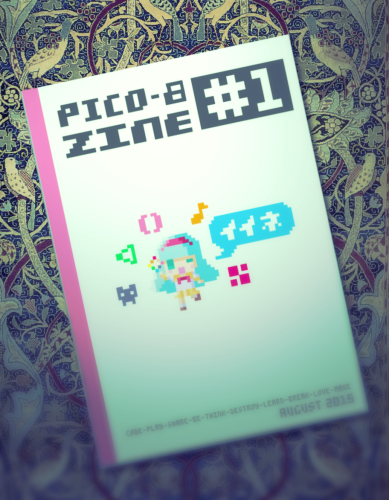
Yep, I just received my first PICO Magazine, a lovely 47-page magazine dedicated entirely to PICO-8.
Opening the pages, here are the table of contents:
3 ... A Brief History Of PICO-8
We interview ZEP himself ! The founder of PICO-8, and what a tangled tale he weaves ! Telling us not just about the origins of PICO but systems he created prior including POIDO (Pointy Dough), Lex500, and Voxatron.
10 ... Squashy
Your first PICO game ! Introduces you to Command Mode, some command functions, user input, sprites, sound effects, and putting it all together - with full source code and screenshots included.
22 ... Let's Make Some Music
Gives you firsthand experience of the sound and music editor, and how to build effects and songs in them.
30 ... Toy Train
A more advanced look at programming introducing topics such as object-oriented programming, switch states, and having one object follow another through recursion. As SQUASHY is, full-source code and screenshots for all images are included for this game as well.
38 ... Geodezik
A simple program to type, complex in its execution, however. Draws lines out as vectors and creates a type of Spyrograph effect in the center.
39 ... Smoke Particle
Particle effects to me are one of the most exciting features of PICO. With it, you don't just hit a bad guy and flash a single POW sprite. No, you can have particles, hundreds of 'em ! All dashing off with their own properties to give you some serious and true eye candy for the agile player.
The example code demonstrates the ability to create 'smoke.' Complete with source and text on just what is happening and where in the code.
. . .
Between chapters are some niceties, like a truly retro picture of what PICO would look like were it a real console for its time and some lovely vector graphics below.
43 ... Welcome to PICO-8 !
ZEP returns and talks about his wonderchild, CELESTE. Not just your basic platformer but a high-powered one with special moves any super heroine would want.
. . .
What follows are screenshots descriptions, instructions, and download links by the programming author.
Stories At The Dawn
A decidedly darker platformer with tricky puzzles to say the least.
Pat Shooter
A serious topview shooter with lots of particle effects, ship's shielding, and enemy strengths.
Transdimensional Butterfly
A PICO program that explores the beauty and complexity of math to make this mesmerizing and most-colorful animated display.
The Tower Of Archeos
A tricky turn-based puzzle where you must survive by intelligently picking your battles with a large number of critters and enemies. Do well and you are granted the next level of play.
Tempest
A work-in-progress that is still in beta but still holds a few bugs. The premise is amazing for tiny little PICO-8 to run though - a topview adventure game where survival is key, including finding food and shelter.
WormWormWormWorm
Another Screen Teaser, this time a kaleidoscopic worm wanders the screen and computer-generated music plays in the background.
MTRX
You're familiar with the special MATRIX effects of the green characters descending from the top of the screen, right ? Well, in this program they collide from all 4-corners, crashing into each other with a cacophony of sound effects.
Delia Mute In Grave Grotto
An impressive rogue-like game with item pickups, combat, and traveling further underground through a series of descending stairs.
The Adventures Of Jelpi (with Corrupt mode)
A curiously unusual game to say the least. It's your basic platformer but enemies here poke values directly into memory causing your game to glitch. It's up to you to find the exit before PICO crashes !
All programs include an ONLINE LINK to each of the featured carts so you don't have to code them in yourself.
Additional carts mentioned w playable and download links are: Stray Shot, Endless Train, Random Sound Generator, Video Poker, Piano Simulator, Duangle 2015 Intro, Thopter Escape, Bounce, Puzzle Cave, and Sumo Pico.
. . .
While the hardcopy magazines of PICO-8 are now sold out, you can still get the digital version of the magazine to read from Online. And that link can be found right HERE:


 1 comment

This is a feature request, and I hope not a lightly dismissed one.
Having tried out some games that keep track of your personal high-score, would it be possible to have a future PICO save not just a unique file but a SHARED online file. Perhaps no bigger than 256-bytes per cart ?
In this, people could play a game, post their high score. And afterwards - see EVERYONE else's high score for who played the same video game written by the same author so they have something to compete over.
This would open up all kinds of interesting new things including MORPG, MUDS, and 2- or more simultaneous player games.
cartdata("rockets_romance")
sharedno=wget(0)
|
So let's say two people are playing the game at the same time.
The moment wget() or wset() is activated, it retrieves that value from Online.
To prevent a bottleneck, if the system is 'busy' with someone else reading or writing an Online value, it waits until it can have a turn to read or post a value.
And it also uses a method of timeout for everyone else so few to zero bottlenecks would ever be reached. Possibly a 1-second delay to read the same Online value more than once by the same person (which should only occur if you reboot the game).
5 comments

Or perhaps ... that should be Co-Creationism ? :)
I've come across this helpful site with 2 curious pages:
https://neko250.github.io/pico8-api/#coroutines
While these commands are listed in PICO help as part of updates, no information is given as to what they do or how to use them.
The other curious bit from there is a POKE chart. I tried poking numbers into these and plotting sprites and text afterwards in an attempt to get double-size pixels; they all appear at normal size.
https://neko250.github.io/pico8-api/#peekpoke
A fully working example program for either of these would be immensely helpful.
One more thing, perhaps a little simpler. Is there a way to retrieve the current X & Y of where the text cursor is currently in a cart (Prior to PRINT()) ?
2 comments

Likely this question has been asked, but I'll ask it again anyways.
With PICO, you can create games. To run either in Lexaloffle's BBS or with HTM/.JS elsewhere.
Is there a way or is it planned that games might be compiled to true FLASH ? *.SWF.
I just uploaded my notepad cart to Kongregate to check it and, sure enough, it still has staggering issues. I will say ALL PICO programs I have seen since I arrived, all stagger in my Firefox browser.
Is there a way to fix this or is it an inherent trait of Java/LUA ?
What Flash programs I have written in the past - all run top-speed today and have never shown any Online hesitation.
8 comments


It is popular with some programs to POKE directly into the graphic tile space either temporarily for storage or to save off some new generated tiles.
cls() poke(0,255) spr(0,64,64) recover(0,1) |
My question is - is there a way or command to 'recover' the tiles (or any other memory location you've messed with) WITHOUT creating or using a separate array of prior storage ?
These memory locations are after all ROM in every sense of the word in that when the program ends and you are back to the editor, all your tiles or mapping, etc. are untouched despite you using their space during run-time.
6 comments


3D test & Sprite data converte
https://www.lexaloffle.com/bbs/?tid=27767
Add a text data output in the "PICO-8 Palette Mosaic"
PICO-8 Palette Mosaic
http://www6.plala.or.jp/TimeTripper/html5/pico8.html
0 comments
Yep, some more casual observations by dw817.
Just a suggestion for the FORUM. Can add a NEXT or PREVIOUS when reading BBS messages to go to the next or previous initial BBS message that was written.
Signature lines for the forum anyone ?
Errors (or problems) I found:
local a,b,c -- accepted
local a=3,b,c -- accepted (This method is listed in LUA help)
local a=3,b=2,c -- error
local a,b,c=3 -- read wrong, number stored in "a"
Loading code currently includes loading any spaces that might be inadvertently added to the end of a line.
Suggest in loading they be truncated, I.E.:
One line could read:
"cls() " -- and have 2-spaces on the end. This is saved when the source is saved.
Loading a code could truncate this:
"cls()"
Or even in the EDITOR, automatically truncate leading spaces as they are not needed.
While they don't count in TOKENS, they =DO= count in source code bytes used of the available 65536.
Since the code editor's top-left-hand corner of the screen is blank, it could include information including the name of the last saved file. This would be useful when working with two-different PICO files that are open in two PICO editors so you don't confused as to which is which.
Suggest that anything between --
0 comments
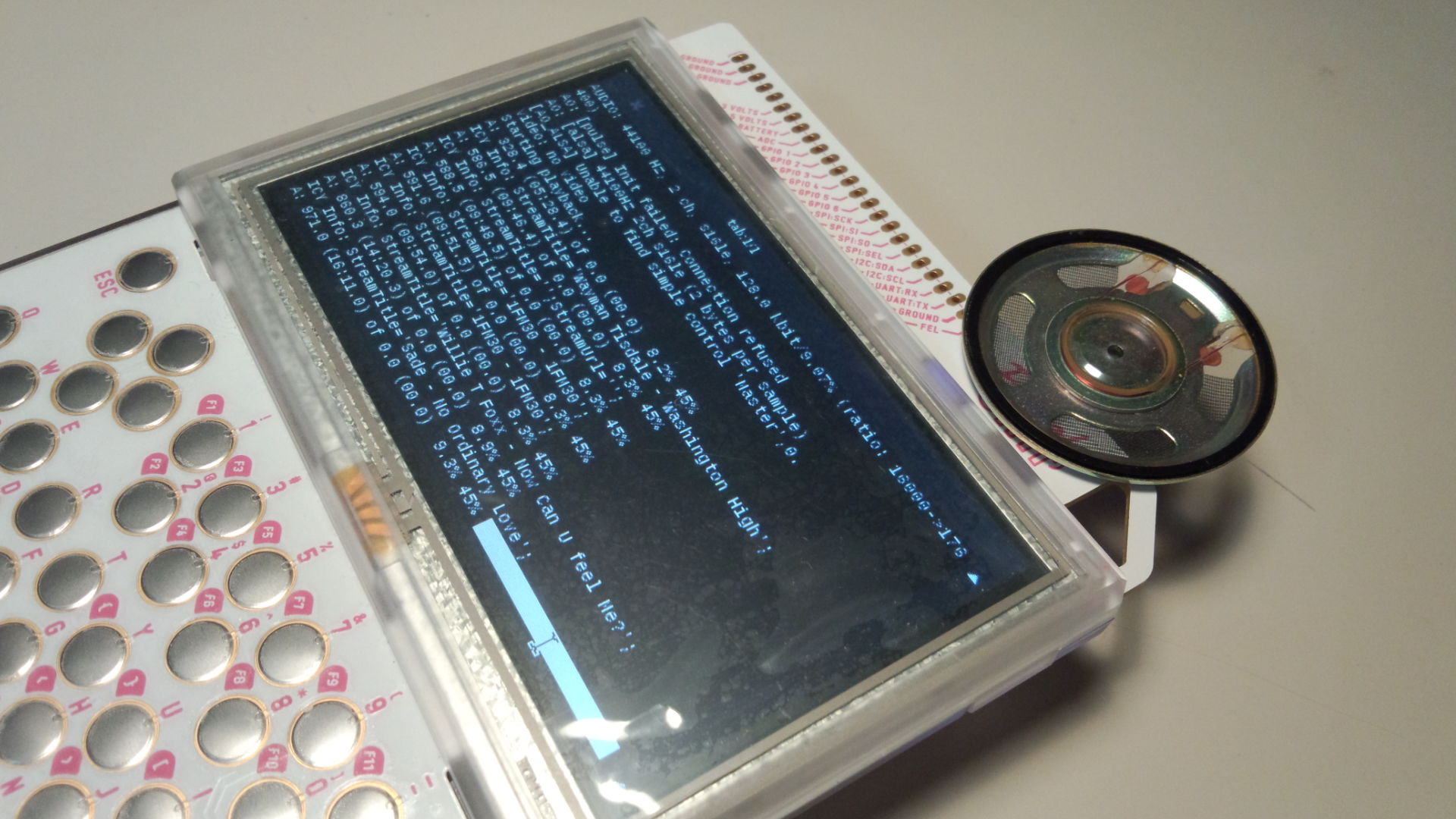


Hey everybody!
I downloaded Pico-8 a little while ago because while I've developed some games in the past - they've all been with programs that didn't require any coding on my part (like Twine). But I've really wanted to start working on what I've always wanted to make: a basic exploration-based platformer. I've never really worked with code in my life and I've looked up several tutorials, but I haven't found anything yet on how to make a game like this and I'm really struggling with getting started on this (coding is a lot more intimidating than I thought even though Pico-8 simplifies things by a huge margin).
Basically what I'm asking is - where do I get started to make a basic 2D platformer ala Super Mario? Thank you so much to anyone in advance who has any helpful advice or comments. If I ever get my passion project made I'll be sure to share it with everyone here :-)
1 comment


I want to add two more enemy types to 'Bobs Adventure' to add a bit of variety and a sense of progression to the game so that when you come across something tougher, you know you're getting closer to the end but I can't decide what these two types of enemies should be.
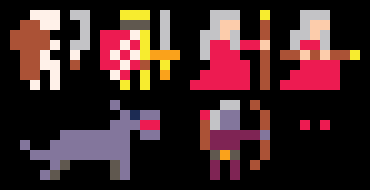
Option 1: Skeleton
A Skeleton. I guess the skeleton would be tougher and do more damage than a zombie. They could even keep getting up after you kill them which would be kind of cool in a room with difficult platforming
Option 2: Gold Knights
Prettymuch a copy of the player. These guys would be in the last section and would be pretty darn tough. I would have made them Black Knights but It would be too awkward to make them stand out against the background tiles.
Option 3: Zombie Archer
I like the idea of having a ranged enemy. Several ranged enemies in a room could become almost like a puzzle to avoid the shots and they would play so differently to the normal zombies that it would add some good variety.
Option 4: Pyromancer
These guys would be functionally identical to the zombie archers, really but I think the archers would be in large quantities and deal less damage whereas I feel a wizard should be really powerful but not that numerous
Option 5: Spectre
Having a ghosty floating around as just a pair of red eyes would be kind of cool, since my background environment has the red eyes shown, so the real spectres might be harder to see. These guys would basically be invisible and float around. Maybe acting like a Boo in Mario games, where they only move if you're not looking at them
Optiong 6: Zombie Doggo
My least favourite option. I'm not happy with how the sprite looks and I don't think I could animate it very well. It also takes up two sprites so there might be a memory concern...
I think roughly what I want is "projectile dude" and "tough dude" in some form.
So these are my ideas so far. If anyone has any thoughts on which of these might be better, or a suggestion of something different, that'd be great^^
7 comments
I honestly didn't know there was a blog element to this. Nice :D
The main thing I'm working on is called "Bob's Adventure" which is probably just a working title, even though its meant to be kinda dumb.
so far, I've had my Pocket CHIP for a little over a week and I'm reeeeeally enjoying the ability to just walk along coding, and by making really simple little sprites, I don't need to worry about a long drawn-out design process and talking to 3D modellers to make any progress. I can just blast out some rubbish sprites and get on with the fun coding bit! Love it!
Hopefully people will check out my game as it gets updates. So far, there's not a whole lot to do on it other than wander around and kill zombies, but my goal for the game is two add two more enemy types, expand the level and then have the game culminate in a boss battle. I also want to add more music and animation along the way (memory permitting!)
1 comment

Going to use this post to keep track of PICO-8 related links I may want to reference later
INPUT
Input layout
0 comments
I am understanding that you can tell a 'variable' to mimic a command, thus:
r=rnd print(r(6)) |
I am wanting to know how to code this, preferably using only one 'variable' and without making it a function:
a=rnd b=flr(a)+1 print(b(6)) |
How would you do it ?
10 comments


Could someone please post a fully working example program making use of the CSTORE command and how to maintain user saved data even if the version changes by creating a 2nd file as the instructions hint at ?
8 comments

I just had an Idea while messing with my TI-84 plus CE calculator. What if, When the full version of Pico-8 comes out and they start making ports to other platforms, they made a version for the TI calculators that had color screens like TI-84 Plus CE or Nspires. I don't know if that would be possible but I like the idea. Let me know what you think. Maybe one day they can make a port for it. :D
-DerpsMcPineapple
1 comment

As I'm getting deeper and deeper into my PICO code, I am finding a few things, and perhaps suggesting some additionally.
Allow FUNCTIONS to be below main code. Many programming languages do not care where you write your functions. It's convenient for me to have them beneath my main code which is the opposite of what PICO requires currently.
Are parentheses really necessary for commands that will always start as the first code ?
PRINT
CLS
I understand it takes two "=" for a comparison. I can think of several programming languages that do not do this. You might keep it as deprecated code, but also allow "=" in a comparison. Quite simply, there should be no need to set a value while making a direct comparison, so "=" could be done this way.
Are parentheses really necessary for other commands ? GFA and BlitzMAX, ONLY used parentheses for functions that return a value or if you wanted to change the order of the operands in a mathematical calculation or a logical comparison. Incidentally, () would never be used except to describe the parameters of a function that does not return a value.
A=ADDUP(16)
CHECKADD A
A=(B+C)*D
CLS clears the whole screen yet ignores CLIP().
A command CLSCOLOR() would be nice to set the CLS color so when it is called, instead of always BLACK, you could have a different color.
Option for LOAD and SAVE state when playing a game from SPLORE. Then you could leave one game, play another. Then go back to the other game at the same position you left it. This would not be cheating as once you SAVE state, you exit that game back to SPLORE.
Only when you load the game again in SPLORE do you have an option to LOAD state and set for the ability to SAVE STATE again. During the game you CANNOT use LOAD state, it is only to recover your position optionally when playing a game.
Instead of an error message stating what line # it occurred on, show an error dialog, perhaps go directly to the editor on the line and column where the error took place along with a dialog box.
Ability to FOLD functions. That is, if you are on the first line of a FUNCTION, you can press F10 or some other select key and it will fold up - not showing the contents and only the name and arguments for it.
FUNCTION ADDUP(N)
RETURN N+1
END
FUNCTION CHECKIT(N)
IF N==0 THEN RETURN -1
END
(2 folded functions)
FUNCTION ADDUP(N)
FUNCTION CHECKIT(N)
Ability to have split edit. That is, you can have one frame above which is at a particular line # in your code and an edit frame below that which can be at an entirely different line #. Useful for debugging complex functions and their calls to main code.
Force readable coding. That is, do not permit this or any other way to convolute coding:
IF (A==5) B=3
Instead it could be:
IF A=5 THEN
B=3
ENDIF
Allow ENDIF as a possible command. END can also be used as a deprecated command, but ENDIF only with an IF statement.
Same with FOR, have a NEXT. Variable name not needed for NEXT, however, unless operating in STRICT mode. (That is something else).
Add a new command, DBUG:
With it, it will choose the top-right-hand corner of the screen and show the variable name + value, updated every time screen is updated:
DBUG A,B,C
A=1
B=A+2
C=10
Display in top-right-hand corner of the screen right-justify flushed during runtime shows:
A=1
B=3
C=10
It could also update every time you call FLIP()
Either that or create a new small panel to the right of the enlarged 128x128 screen and with legible Truetype font and text so it does not interfere at all with the game display.
Use NODBUG to remove a viewed variable during runtime. Exiting a program removes all DBUG variables. Your code MUST have DBUG in order to view them again.
When using UP ARROW for command history when in FILER mode, you could skip over repeated entries. I.E: here is the history
PRINT A,CLS, RUN, CLS, RUN, CLS
Pressing UP will reveal CLS, RUN, but if it is CLS again seeing a repeated pattern, then it will just skip to PRINT A. In fact, there is no reason to save copies of the same command set in history if it is already listed at least once there.
Naturally a repeated command will prompt it to appear at the bottom of history so it is recalled first as it was the last item entered.
NONE of the keys from the keyboard currently work in the PICO editor from NUM-LOCK: HOME, UP, PGUP, LEFT, RIGHT, END, DOWN, PGDN, DEL. I use these all the time in other programming lanuages.
The INSERT KEY is not being used at all. You could use it like SPACEBAR to move typed commands to the right, but instead of the cursor moving additionally, it would stay in the same position, so in effect it just PUSHES what is typed to the right by one-character.
Thus, where the uppercase letter represents the position of the cursor to start, and _ represents the same position of the cursor after pressing INSERT.
ripeApple
ripe_apple
Some commands that I believe would be useful that are not included with PICO:
CHR$(), ASC(), VAL(), STEP, SUBROUTINE, ENDSUB, ENDFUNCTION, PRINT USING,
MKL and CVL to convert 4-bytes to and from a single variable value
PEEKWORD, PEEKLONG, POKEWORD, POKELONG. There may be others.
FILL(X,Y,PaintColor,EdgeColor)
If Paintcolor is not chosen, it uses default color. If Edgecolor is not chosen, it uses any color that is not PaintColor.
add options to CIRCFILL and RECTFILL thus:
CIRCFILL X,Y,Radius(,FillColor,OutlineColor,ThicknessOfOutline)
RECTFILL H,V,X,Y(,FillColor,OutlineColor,Rotation,ThicknessOfOutline)
XRECT H,V,X,Y(,FillColor,OutlineColor,Rotation,ThicknessOfOutline)
(where X & Y are not ending coordinates but pixels across and down)
Same with LINE.
LINE H,V,X,Y(,C,Rotation,Thickness)
XLINE H,V,X,Y(,C,Rotation,Thickness) (where X & Y are pixels across and down, negative for left and up)
LINETO X,Y(,c,Rotation,Thickness) (where the line is drawn directly from the last line drawn and X & Y in this case are not coordinates but pixels adjusted from the last plotted position.
So if you draw a line FROM 50,25 to 100,75 and then used LINETO 0,-10 , the last line drawn will be a vertical one 10 pixels above 75 giving you vertical coordinate 65.
Also add:
OVAL and OVALFILL:
OVAL X,Y,RadiusX,RadiusY,OutlineColor,Rotation,ThicknessOfOutline
OVALFILL X,Y,RadiusX,RadiusY,FillColor,OutlineColor,Rotation,ThicknessOfOutline
Might have ROUND and ROUNDFILL as well, to create Macintosh-style rounded frames.
CurveStep is # of pixels to draw a curve. Zero is none (same as RECT), 1 is 1-pixel, etc. 3 would yield a nice Macintosh style curve.
-- -- -- -- -- -- -- -- ## ## -- -- ## -- -- -- ## -- -- -- -- ## -- -- -- |
20 comments


