


After lots of looking for a decent portable Pico-8 console that I could code on I settled on a used Pocket C.H.I.P. for a pretty good price. So far I had trouble updating it to take advantage of certain things but I eventually figured out how to update Pico-8. Now I just have to learn how to make use of the big scary terminal and get better at coding Lua!
UPDATE: About a week after I got it, it turned on in my bag and killed itself somehow. It is now just a brick of plastic with a screen. :( The error is with pocket home not launching because some files are gone and since Nextthing.co went bankrupt I don't know where to find replacements. If you have any advice that isn't just reflashing it that would be appreciated because I still am scared of the terminal and don't have a linux computer (other than a steam deck). Also sorry I have been silent for so long I just had a lot going on otherwise and haven't had much time to do this and my other interests. I have been working on a short funny game off and on for all of this time though so hopefully I will post that sometime.


 0 comments

hey so basically, on the P8SCII chart, the first row of characters (1-15) seems to be inaccessable when using chr() and there seems to be no keyboard shortcuts to type them out. anyone know anything about this?
2 comments


Hey all!
I came across this website today for the first time and was playing a few carts on the main page. I was playing this EXCELLENT game from one of the selections on the right, not realizing that these carts re-load when leaving the page. I have literally been browsing for an hour and a half trying to find it, here and on itch.io. I was hoping you may be able to help.
- Was a very polished/high quality game
- Color scheme was nearly all black and white
-
Character design was high quality
- Game started with you choosing 1 available character with others that were locked
- You were shown 6 sides of your die that contained a sword, spear, shield, and sling
- Once game starts you are on a 5x12 ish grid split into 5x6 + 5x6
- Character could move freely on his grid, while an enemy or multiple enemies could move on their grid
- Character rolls a die for an item (sword, spear, shield, or sling)
- Game pauses momentarily showing you the "range" of the weapon
2 comments


Hi there, Mx. Casey here!
Here's a little toy I made to show my class the concurrency of the special segments in a triangle. It highlights points of concurrency, so you can see where the points lie for different triangles.
CONTROLS:
< and > change which vertex of the triangle is selected
Arrows + holding X drags the selected vertex
O switches between medians, altitudes, angle bisectors, and perpendicular bisectors being drawn.
0 comments


Save poor Roberto's soul by concentrating on your prayers before the devil themselve takes over in this 1kb microgame!
Game made for the Pico-1K Jam 2025!
Original Idea and text: JaviS
Prigramming and art: Tréveron (@trevvieaamb on bluesky)


0 comments

Hey Pico-Peeps.
Database spirit here, broadcasting a signal into no the no where of the internet- kind of like a satellite sending radio waves... or maybe turning into space junk?
After playing around with Spacecat and PixelPete tutorials I've finally made my first game- which of course is a rip-off of another game, but hopefully with an enjoyable little twist.
It's... drum roll... Fruit Drop by nerdy teacher- but this time fruits down vanish when they hit the ground- they splat!
In the future I'll learn about sounds in pico-8 and make a nice splat sound to go in the game.
0 comments

World of Pixeltron (WOP)
After much trouble and debugging I have gotten this to connect to a local Express API and successfully:
- signup
- login / logout
- check users
- ping the API
I have not written any state logic for the game part yet. I’m also not the best pixel artist in the world — but the network backbone is working.
Why I’m Posting This
My hope is to find like-minded individuals who want to help create something really neat for folks with Picotron cyberdecks everywhere.
I named the cart WOP for World of Pixeltron.
A Little Background
As of recent months I got pulled into WoW Classic and the whole Turtle WoW “Classic+” hype.
I’ve run my own private WoW server for years, building backend and database systems.
At first, I didn’t think parts of the client were editable… then projects started popping up.
That’s also when Blizzard’s ban hammers started falling.
0 comments



Hi!
I'm Ch0p5h0p, but I'm known here as Blooper7.
I mainly specialize in firmware writing in C/x86 and making other projects in Python, but I like to make some games every now and then. I'm into platformers, story games, shmups, and bullet hells.
1 comment

okay so basically this trick almost gives you infinite savedata
first, choose a memory address above 0x7fff to represent a progress counter, a memory address above 0x7fff to represent if the game has already set the progress counter to 0, a memory address above 0x7fff to represent the progress before updating, a memory address to declare if the game has started, a variable declaring if the game is calibrating the save values, and a variable inside the game declaring how many extra groups of 64 savedata values are required.
second, in the _init function, set the initial progress counter to the actual progress counter. make an if statement which checks if the progress counter is equal or over the limit. inside that statement, run cartdata with an id concatenated with the progress, set a group of memory addresses to the cartdata values, change the progress counter by one by using the initial progress counter, and then finally load the cartridge again.
third, in the _update function, add an if statement which checks if the game has started. move all of the previous code inside of the _update function into that statement.
0 comments
this method exists which almost no information is spread about on the internet
all you have to do is print "\A" concatenated with the note, and then the octave e.g:print("\AD#3"). this plays the D# note on the third octave you can also print a message as it plays if you concatenate the string with a space, and then the message e.g:print("\AD#2 Hello World!"). one thing i find really cool about this feature is that you can harmonize notes by concatenating multiple notes by a space e.g:print("\AD#3 \AD2 \AD1 \AC#1 \AD0").
0 comments

Hello!
I'm currently working on a system for loading and saving text files. My end goal is to have an exported binary for my Pico-8 program. This however introduces some limitations, as exported binaries can not import user-editable files from disk. It is however possible to load files that are dropped from a file explorer into the Pico-8 program. To make it easier for users, I want to open the OS file explorer from within Pico-8. Usually this can be done from the Pico-8 terminal by typing folder, however this command does not appear to work from within a cart.
I'm fairly certain this can be done, as the Picocad binary allows the opening of the file explorer.
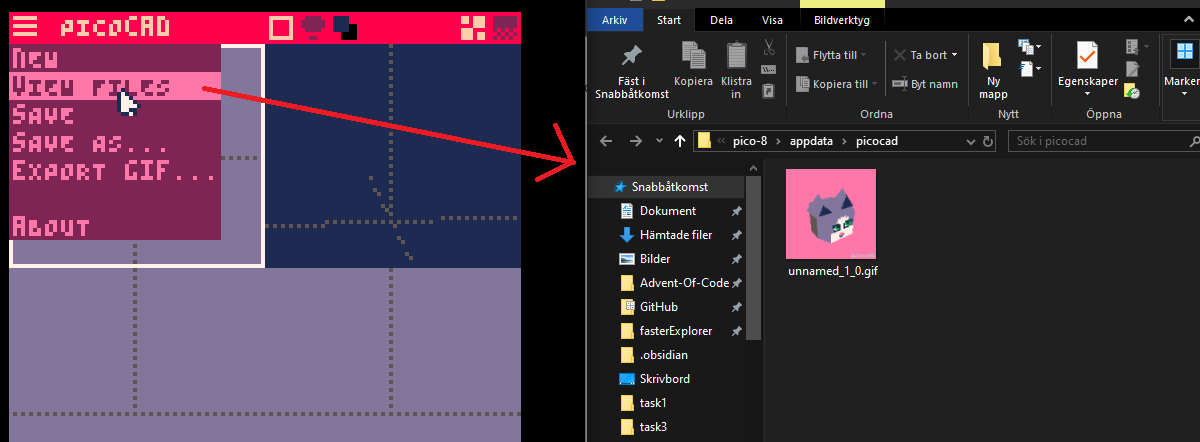
Appreciate all answers/ suggestions!
2 comments


fairly simple question, is there a way that a cart can write data to disk to produce another cart? I ask because I am wanting to make a tamagotchi type thing to learn some of the more of the pico-8 API that i otherwise wouldn't,such as multi-cart projects, as well as making a menu, something I surprisingly haven't done before. (any tips on that would be appreciated 😅). my current idea is that you would have the main menu, a standalone cart. it's sole job would be to create and load another cart, that being the main tamagotchi cart. each pet would have its own cart, that could be loaded by just skipping the main menu and loading the cart. my current issue is that I don't know how a cart would create another, or even if that's a possibility. another option would be to have a template cart that then maybe gets loaded with arguments, allowing for customisation that way?
0 comments


Soul Survivor
A small game I made to learn pico-8!
You've taken part in an ill-considered ritual to summon a demon! Little do you know the process has put a hole in your membrane, the one defense you have against the colorful bouncy spirits lurking in your home! (and everywhere else).

|
[16x16] |

|
[8x8] |
0 comments