


Farmer's Market
Hi guys, I participated in a game jam a few months ago, it was my second time using pico8. I had a ton of fun building this :)
About the game:
Starting with just a patch of dirt and a pocket full of dreams, you’ll plant seeds, harvest crops, and sell them in a dynamic, reactive marketplace. But you’ll quickly learn: growing food is only half the game.
The market
Prices rise and fall based on randomized news events that shake up supply and demand.
A beet surplus?
Bad for business.
A carrot catastrophe?
Time to cash in.
Stay alert, act fast and time your sales to maximize profit.
[hidden]Psst!.. want an edge? Pay for insider info and get early access to market-changing news before it goes public.


 0 comments


This is my first finished Pico-8 game! Well, not finished, but it’s playable!
Controls
The controls are simple: move the mouse around the maze with the arrow keys, and break a wall by pressing X. You have to have a pickaxe in your inventory in order to break a wall.
Rules
The game has only three levels at this time. The first two levels are kind of training levels, and the third level can be fairly tricky to complete. A timer counts down from 100 for each level; if the timer reaches zero, or you are caught by a cat, you lose a life and start the level over. You have three lives to complete all three levels.
Collect cheese and points by running over the cheese. Collect a pickaxe by running over a pickaxe. You can have a maximum of three pickaxes in your inventory, shown in the status bar at the bottom of the screen.
6 comments



In Lil Kobold's Big Stew, you play as a little kobold who needs to collect special ingredients for his big stew.
This is my 15th proper game since last October and I'm really happy with how this one turned out.
Happy Halloween!
10 comments








PicoTestDriver (PTD)
Automated Testing for PICO-8
Stop manually testing your game every time you change one line of code.
You know the drill: refactor your player physics, suddenly collision detection breaks. Add a new enemy, bullets stop working. Spend hours debugging, realize you broke something two commits ago.
I built PicoTestDriver to solve this. Write tests once, run them in seconds, catch bugs before they ship.
What it looks like
./ptd test -c my_game.p8 === PicoTestDriver v3.0.3 === [INFO] Testing player movement... PASS [INFO] Testing bullet collision... PASS [INFO] Testing enemy AI patterns... PASS [INFO] All tests passed in 12 seconds [ [size=16][color=#ffaabb] [ Continue Reading.. ] [/color][/size] ](/bbs/?pid=176627#p) |
2 comments




Ritual Duties
Small game made in less than 3 hours for Trijam #343! (And it ended up winning!)
Listen to the cultists wishes, look up the requested ritual in your book, perform the ritual before time runs out!
Game is controlled with the mouse, left click to pick up items and left click to drop them, or left click and drag them. Right click to discard your currently held item. Click on the book icon to open and close the book or open it instantly with right click, and switch page with the arrows on the sides.
It also has full controller support!
Everything (besides some light planning) was made during the 3 hour time period. Unexpectedly, the main gameplay was done in a bit over an hour, so I had a lot of time to polish it and make it feel complete! Really proud of the result!
4 comments




I was doing some play testing on my first game release, and noticed unfortunately that on my iPhone I am unable to hear any sound/music from the PICO8 webview.
I understand that this is not a new issue as I found this 8 year old GitHub repo:
https://github.com/nucleartide/fix-pico8-ios-sound?tab=readme-ov-file
The repo only mentions Safari, but I can confirm the issue exists for Firefox and Brave browsers as well on iOS. Has there been any new developments on this roadblock, or is the only option to edit the HTML as is mentioned in the repo?
0 comments


CELESTE DMG
For all the DOT MATRIX SCREEN lovers ;-)
Enjoy!
WHAT IT IS
A recolorization of the original Celeste game, aiming to look like the old-school
Gameboy DMG tint (within the possibilities of PICO-8)
The file that was modified is the one you get when you LOAD #CELESTE in the
PICO-8 terminal (#CELESTE-3 (26589 CHARS))
WHAT IT LOOKS LIKE


EDIT:
If anyone is interested in playing this with a giant, bulky GameBoy bezel around it
check out the itch.io page
5 comments


Flying beetle


Description
Help the flying beetle reach the treetops to live its beetle life there.
Credit
This is my first project on PICO-8 and in LUA.
The game is largely inspired by tutorials from the Lazy Devs YouTube channel. I'm very grateful to the channel's author – many mechanics from there were interesting and useful.
0 comments


Tallbike Knights
Everybody loves listening to metal and jousting tallbikes, right???

Controls
Keyboard recommended - not touch screen friendly.
Pedaling
To move forward, mash x & o (alternating).
Get into the music and you'll find your hand doing this on it's own!
Balancing
If the red balance bar reaches the extreme right or left, you will fall off your tallbike.
Keep it as close to the center as possible with the Left and Right arrow buttons.
Aiming your jousting pole
Joust pole is in the neutral position until you press the up or down arrow buttons.
Press up / down to match your opponent's position.
5 comments



Sometimes, being a hero sucks. Instead of fighting monsters, you’re tasked with collecting all the slime and tidying the world.


- Collect upgrades to improve your speed, range, sucking power and energy.
- Watch your energy level — if it reaches 0, the game’s over!
- Every run is different! You’ll spawn randomly, and the slime and upgrades are also randomized.
Super Sucker is the game I've made with my good friend leorean for Ludum Dare 58. Here it is now after some post-jam cleanup. I hope you enjoy, thanks for playing! ❤️
7 comments




When playing SFX on more than two channels, it seems you can't use the same SFX-ID. (Is this because the sfx1 page doesn't have four sequencer clock channels? It's not a problem when using it as a custom instrument.)
Only the final SFX will be played.
sfx(0,0,0,16) sfx(0,1,16,16) -- Only ch1 will be played. |
It is played on two channels.
sfx(2,0,0,16) sfx(3,1,16,16) |


This cart has melody notes and noise notes entered in the first and second halves of sfx0.
sfx2-3 is a copy of the first and second halves, which is the intended behavior of the SFX playback on the second line.
[sfx]
1 comment


How to Play
- Clear 25 waves to win
- The snake head can take damage from enemy bullets and enemy contact
- Snake guns fire automatically
- 2 hits to the head, and the gun closest to the tail explodes (1 hit on Hard mode)
- Enemies drop energy upon death
- Pickup energy to add a blank to the snake and restore half a heart
- Spend blanks to buy guns
- A new gun segment locks away any unspent blanks behind the gun
- Example: You have 4 blanks and buy a gun that cost 2 blanks, your new blank count is 0 and 2 blanks are between the old gun segment and new gun segment - Each gun gives the player another heart
- Snake boost gives invincibility and allows snake to damage enemies on contact
3 comments



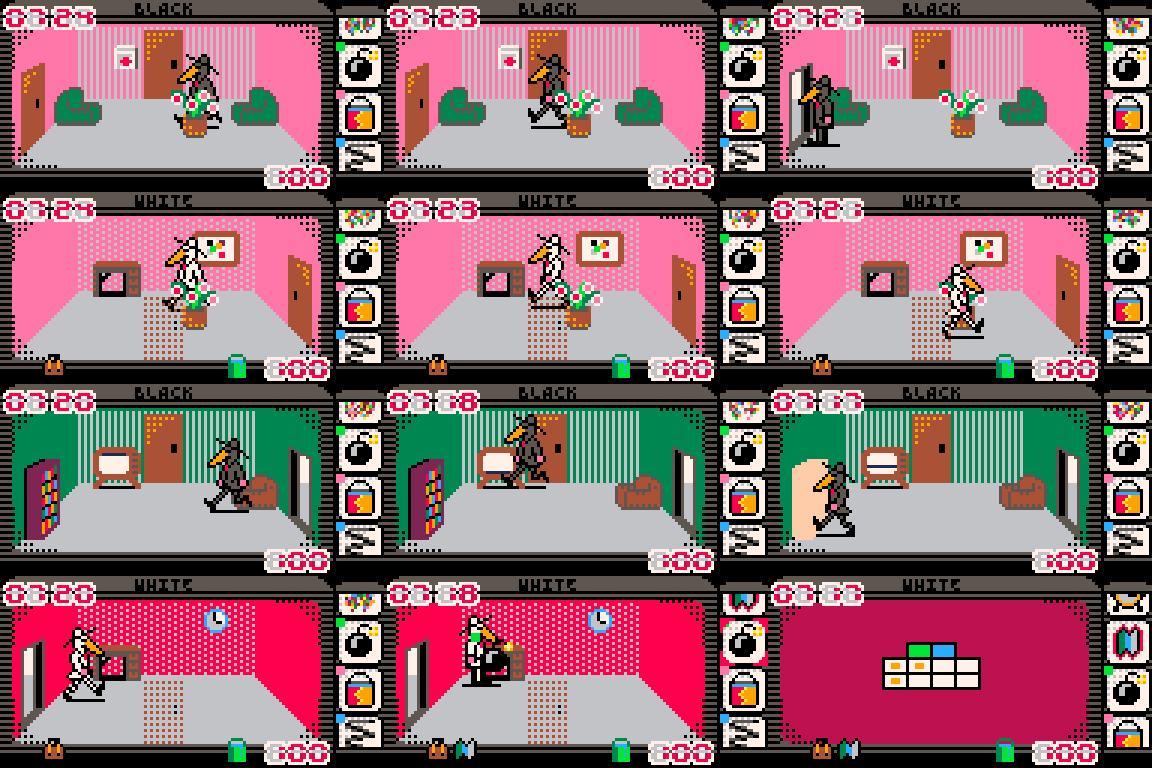
Spy vs spy demake editor

Cartridge overview
Here is the editor that I used to create the levels of Spy vs spy demake.
👉 Game thread here
https://www.lexaloffle.com/bbs/?tid=151525
Usage
Make sure that you have the two Spy vs spy p8 files:
- launch Pico-8
- run the following commands:
load #spy_vs_spy save spy_vs_spy.p8 |
- edit spy_vs_spy.p8
replace "#spy_vs_spy" by "spy_vs_spy" and "#spy_vs_spy_game" by "spy_vs_spy_game"
load #spy_vs_spy_game save spy_vs_spy_game.p8 [ [size=16][color=#ffaabb] [ Continue Reading.. ] [/color][/size] ](/bbs/?pid=176552#p) |
0 comments

I was working with the sprite editor. I was surprised there were no shortcuts to switch between the ~6 options on the sprite editor.
- Select and Pan do have momentary shortcuts that active while holding (SHIFT or S for select) and <space> for pan.
- However it seems it would be nice to have some keys assigned that behave as if the mouse clicked them. For example:
- D = draw
- T = stamp
- E = select (non-momentary)
- P = pan (non-momentary)
- B = fill (bucket, gimp uses Shift+B for bucket fill)
- C/Q/L = Circle/Square/Line
- Or perhaps a row of keys mapping to the options positionally?
- 3 = draw
- 4 = stamp
- 5 = select
- 6 = pan
- 7 = fill
- 8 = shape
I don't know if there is a place for feature requests or if feature requests are accepted.
73,
Timothy
0 comments


I made this little washing machine simulator for my toddler to play with on my pico 8 arcade. She loves washing machines and ducks ❤️
Two ducks of the same color poof away from the machine when they collide. The number on the top right is just a little counter of how many have collided in the current session.
Controls
- LEFT/RIGHT: spin the drum
- Z: add suds
- X: add ducks
 7 comments




Needed a way to monitor my CPU usage for filenav in a more digestible way, so I made this.
It has 3 modes:
Global: one line for the CPU usage of every app
Global Show Seperate: each process is shown seperately with a different color (color key given), but together
Process: look at the cpu usage of a specific process
Inputs:
Left/Right = Change mode
Up/Down = Change process in process mode
Fixed some bugs with the monitor & added logging and settings (/appdata/cpuMonitor/)
0 comments
.png)


