


Made for GDEX 2025 Game Jam.
The prophecy foretold that only you, Gary, would be able to stop the dark lord from destroying the world. It can only be you Gary for the prophecy foretold it. Knowing that the dark lord, Aligoricus, could only return in such a way that you could physically defeat him, you bravely spent the 56 of your life eating snack foods and watching television as to nerf Alicoricus to the greatest potential. And now, you Gary, must get off your butt for the first time in your life and save the world.
Play Believe it or Not, Gary Gets Off His Lazy Butt and Does Something Useful for Once in his Gosh Darn Life and enjoy:
-Over 20 lines of dialogue
-A vast and sprawling world to explore


 1 comment



Hello again, I am a complete beginner for those who didn't see my previous post. Been trying to create my own functions to perform certain tasks, but having trouble. In this case I was trying to make functions that could draw and move a player, in a way where I could substitute in different players using the brackets at the end of the function. However when I run this I'm just getting a black screen - so I'm guessing something wrong with the draw function? Would appreciate if anyone can point me in the right direction. Thanks in advance for any responses!
my code:
function _init()
--players
jim={
sprite=1,
x=63,
y=63,
w=1,
h=1
}
jon={
sprite=2,
x=63,
y=63,
w=1,
h=1
}
end
function _update()
cls()
move(jim)
end
function _draw()
drawplayer(jim)
end
function move(player)
if btn(➡️) then player.x+=1 end
if btn(⬅️) then player.x-=1 end
if btn(⬆️) then player.y-=1 end
if btn(⬇️) then player.y+=1 end
end
function drawplayer(player)
spr(player.sprite,player.x,player.w,player.h)
end
6 comments


I tried to configure Picotron in my current RetroPie setup. I got to the point where Picotron boots into its desktop. However I would like it to automatically load the cartridge that I selected in EmulationStation and start it. Is this possible with the current version of Picotron? If so, how should the entry in es_systems.cfg looks like?
5 comments



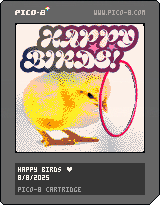
This is the third version of Happy Birds!!
I'm very proud of this version, the final version will come out very soon.
New in this version is:
- new label image!
- new music!
- subtle graphics improvements
- better menu screen
- better SFX
I hope you all enjoy!! :)
1 comment


Hey guys!! This is version 2 of my Flappy Bird clone!
New in this version is the ground moving, variable cloud speeds, improved graphics on the hoops, and an awesome new cover!
I'm hoping to add music in version 3 (and maybe new birds, too!)
Hope you enjoy!!
0 comments
So, I've been bashing my head against settings and config files to no avail on a Raspberry board, so I have to ask this:
Is there any way to (or plans to) allow the screen to be rotated like Pico-8? I sure it was easier there because of the 1x1 aspect ratio, but running picotron from a raspberryOS lite without desktop (for the extra performance) just won't let it make proper use of the screen I got, sadly.
I'm already having a hard time trying to make the touchscreen work properly when things are turned clockwise, but if I could at least have picotron display vertically, part of the problem would be gone.
... I bet there's some insane way to code and configure the desktop so it's vertical anyway, but that wouldn't do what I need. I just need it to render using most of the screen instead of just a tiny thing in the middle.
0 comments





|
[8x8] |
How to Play
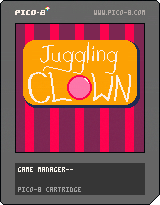
Use the left and right buttons to move the clown, and catch the balls before they hit the ground!
Balls will turn from red to green to blue, and then the clown will have a chance to launch them into the air for bonus points!
Launch enough balls into the air to activate a bonus round! Catch as many as you can, but don't worry about dropping any! After the bonus round, the game will get slightly faster!
0 comments


simple little high score arcade game i've been working on!
pretty simple, maximise speed to win. colliding with walls or hazards stuns you, so avoid that.
after 30s, score is displayed and you can try again.
feedback accepted !!
this is v0.9, the outstanding requirements for me to consider it done are a proper balancing pass as well as a visual overhaul ideally. maybe even a soundtrack
changelog:
0.9 - release!
0.91 - game over screen now uses G key to reset to menu instead of up - should prevent accidental restarts
0 comments

MyMinUI

I've just discovered MyMinUI, a custom firmware for my original RG 35XX... that has native PICO-8!
Note: MyMinUI is a fork of MinUI, a custom firmware much more people know about. MyMinUI is also available for some other handhelds: Miyoo Mini (and Plus), SJGAM M21 and GameConsole R36s.
Instalation
If you want to install MyMinUI on a SD card and try it for yourself, I have some tips for you. First, grab the latest release and unzip it (don't delete the zip file, you will need it).
The instalation is pretty standard custom firmware stuff, and is well documented in the README.txt file. If you have any doubts, leave a comment below and I will try to help.
Now, for my tips... We will change a few files in your SD card - same card and partition where you copied some files from PICO-8 (Raspberry Pi's version) during the instalation process.
12 comments


--Flappy Bird Game Test--
--------- My first Pico-8 game ---------
controls:
UP - Flap
X - Restart

I created the game loop of this game by following a PDF tutorial resource created by Dylan Bennett and posted on his itch.io
Dylan Bennett - Gamedev_with_PICO-8_1
description
This game was a quick one day project where I focussed on learning the basics of Pico8 development and the Lua programming language to make a game!
I used the PDF tutorial to create the basic framework of the game then remixed it with original code and ideas such as the parallax cave background, water, player sprite, snow particles, and other changes.
2 comments


Hi guys!!
This is my first ever game made in pico-8.
It's not fully done, and it's very simple, but i'm so happy with it!!
I hope you enjoy
2 comments


ever wanted a really bad painting program? i got you. X to draw, Z to erase, <- and -> to switch colors, press all four arrows to reset the canvas
mouse and keyboard probably needed or itll suck
have fun <3
1 comment


Hey!
I made a small game called Drunk. It's a short idle survival thing about alcoholism and its consequenses, takes like 5 minutes to play.
You got to survive a year, keep balance between health, money and how drunk you are. If you sober up too much, life gets really hard, game over. If you drink too much, liver gives up, game over.
Drinks go down automatically, you just pick what to drink and how to spend money.
Just patched some stuff!
Main menu now has instructions and info about auto-drinking.
Added sound when picking drinks, tremor shakes even more now.
Fixed some bugs, lose screen has better text and some graphics.
Arrow keys + X, that's all the controls.
6 comments



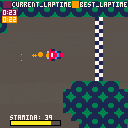

this is my first game im trying to figure out how to upload stuff
work in progress hope you like it somewhat
-
tucker
-log 0
8/7/2025
i added the base alpha version of the game
with only simple menus maps and driving available-log 1
8/8/2025
i added laps and gui for said laps
aswell as making the cars base speed and boost slightly faster via feedback
i am soon to add the lap stats to menu and map selections
*edit laps is broken asf easy fix ill do it later- log 2
8/17/2025
i did a partially fixed the sprite rotation and tbh i dont understand this at all and am using ai to help me completly with this, ima take a long time to actually take time to understand this stuff and at a later date i will actually fix this and make it in a way that isnt me just trying to update and work on my game more, thanks to the guy who commented about this in the foum comment for giving me a reason to do this and not feed the ai system ( i cant see the name from the post editor).
- log 2
3 comments






Learning my way around Pico-8. For graphical / game-like platforms, Conway's Game of Life serves as my Hello World. This was fun to put together. There are two different scales and you can adjust the speed of the simulation.
If I was going to take this further, I'd probably add an editor as well… that's half the fun, anyway.

 3 comments



To those who do not know, here are the controls.
Z/C = [O]
X = [X]
Arrow Keys = [^][v][<][>]

This game is meant to be a demake of another game I've made, but you don't need to play the other game to play this one.
This game takes blackjack, but gives many twists!
You can either play classic blackjack, going to 21, nothing special, or you can do many different modes!

Mode List:
21 game - Classic blackjack, going to 21.
31 game - Classic blackjack, but going to 31!
2=21 - Swaps the ace mechanic to the 2 card, where it can also be 21. Goes to 41.
0 comments


⌛Can you save you and your friends before time truly runs out?⌛
This is my entry for the 2025 GMTK Jam, theme "Loop"! It's an action puzzler that twists familiar block-pushing type puzzle games!
Controls
🔫 Z/O: Fire Time Bullet
🏃♀️Arrows: Move
You can reset the level or skip to the next from the pause menu (Enter).
I hope you enjoy!
If you'd like, you can follow me on itch or all the places here!
0 comments