




Version 0.1.5 is now available! The most interesting change in this version is that it's now possible to create your own character graphics for a particular level. Once you update, here's a level to try it out on:


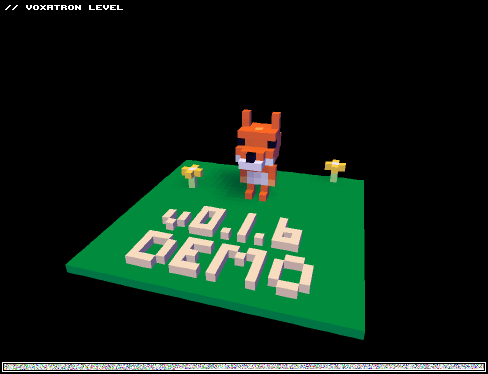
(it's also in the BBS LEVELS menu)
I've just discovered that 0.1.5 breaks vob loading. So, if you need to load any vobs in the editor, you might want to wait approximately 6 hours for v0.1.6, which is a quick patch to fix this. So much for my fail-safe testing procedure. [~ _ ~] ROBOT DISAPPROVES.
In the meantime, you could try drawing over the fox in this level (vob number 6). Or there are some notes near the end of vox.txt on how to set up a character from scratch.
UPDATE: This is now fixed in 0.1.6
The other major change is the ability to filter the bbs level list according to 5 categories:
ALL: all levels (just like v0.1.4)
LEVELS/ WIP/ MODELS: show only levels that corresopond to the BBS category they were posted in
FAVOURITES: show just your favourite levels. Press F when you have a level selected to mark it as a favourite.
Favourites are just an off-line thing for now, but sometime I'll see about hooking them up to the BBS so people can share their favourites lists.
Here's the complete changelog:
Added: Customisable per-level character
Added: BBS LEVEL menu categories & favourites
Added: Optional mouse crosshair style
Added: Mouse sensitivity option
Added: Loading BBS vob as a demo level
Added: Auto-pause when game loses focus
Added: Confirm save over existing file
Fixed: More intuitive mouse control
Fixed: F fast forward during gameplay bug
Fixed: Linux Joystick bug
Fixed: Game clobbers mouse when not in focus
EDIT: 64-bit Linux users -- If you find the framerate seems lower in this version (or in general), try setting opengl_blit to 1 in ~/.lexaloffle/Voxatron/config.txt. You can check the framerate in the video options menu.


You can grab the updated version from your Humble Bundle games page (you should have a link to it in your email).
Just install over the top of your previous version and the old save games should be picked up automatically. If you would like to back up your data just in case, you can find it here (replace "Voxatron" for the name of the game in question):
Windows: C:/Users/Yourname/AppData/Roaming/Voxatron
OSX: /Users/Yourname/Library/Application Support/Voxatron
Linux: ~/.lexaloffle/Voxatron


:: Customisable Character Graphics
The 6th vob has a special meaning if the name of the first item is: _char
In this case, the vob is used as the player's character models for the
duration of the level. In this case, the frames should be roughly the same
size as the usual robot character.
There are 6 body frames, 5 feet frames, and 1 sword&armour frame:
- netrual
- shoot (right)
- shoot (left)
- sword: neutral
- sword: swipe 1 (always right handed)
- sword: swipe 2
6-10 feet // animated in pingpong sequence: 6,7,8,9,10,9,8,7 - is a frame of only the sword and armour used when the player is hit.
All frames should be 16 voxels high.

By breaking the vob loading, does that include not being able to CTRL+C/CTRL+V? Because doing so crashes the game when editing vobs. No problem with regular .png's though.
Edit: D'oh, very redundant post by me >_<
Pretty much nothing works, including saving.

Sound stopped working. It worked in 0.1.4. Volume is set to max ingame. I upgraded by ejecting the .deb package and inserting the 0.1.5 one. I kept the .lexaloffle directory in my home dir.
My specs:
Debian Linux (Squeeze/Testing) 64 bit
Asus P5K SE motherboard (I use onboard soundcard. Card: HDA Intel, Chip: Realtek ALC883)
Backend: Xine
ALSA emulation
Inaccuracies in the vox.txt file:
- it says "Triple" shoots two additional projectiles. It does not, it shoots two, one center one to the side (alternating).
- it says "Blaster" has 8x power. My tests on minotaurs and War of the Worlds tripods show it's actually 5x power.

I'm going to go out on a limb here and guess that 'vob' refers to a 'voxel object bank'?

Hmm, I'm having some trouble with loading the VOBs. I followed the instructions within vox.txt. I wanted to port over the Fox character to a new level, so in your test level I selected the 6th VOB and saved the file as a .vob.png file. In my own level I loaded that up, and not only did it load into VOB #1 instead of #6 (I had selected #6), but it also created a room filled with the Fox objects.
What am I doing wrong? :o
Also, are there some guidelines as to how you should make (or rather position) your custom made characters? I could build on the Fox model, but I'd like to know if there are some basic guidelines if you wanted to create something from scratch.
@DryRoastedLemon : I guess I could try and help you get started.
Vobs are "voxel object banks", and saving a level as .vob makes it act like a storage level, which is why you get a room filled with objects. You could* copy-paste the objects you need from #1 to #6, but at the moment doing so crashes the game.
For best results when creating a custom character, use a 15x15x16 workspace and keep the character in the center. If the character itself is bigger than 5x5x16 it will clip with other objects, but it doesn't cause any errors apart from looking funny.
If you studied the fox character you've probably already noticed that its legs are separate from the body. The legs are "animated in pingpong sequence" and will go 6 - 7 - 8 - 9 - 10 - 9 - 8 - 7. Frame 8 is the "idle" frame where the legs are positioned right below your character.
Hope I helped :]
Thanks for your response :) Alright, I guess I will wait with copying over VOBs once the process is a little bit smoother.
I'm having a little bit of trouble keeping the player object in the center. Any tips on that? For example, I made a little terrorist with a gun that sticks out a little towards the front. Normally I would copy-paste and resize to make objects exactly centered, but the problem with the terrorist character is that the gun shifts the center point.
Any tips on how I can work that out? :)
Make sure nothing is selected when you copy-paste something on one frame to another. If you select all (CTRL+A) it will copy the model, not the entire workspace, and the next frame will automatically crop to fit, which makes the frame smaller.

Still no love for my X-Box controller on OSX. :) Hoping for a fix in the next build :)
ok, the new builds are up. 0.1.6 version fixes the vob loading problem and the broken sound.
kgartner -- could you run v0.1.6 once with joystick plugged in, then send me ~/Library/Application Support/Voxatron/log.txt ? (hey at lexaloffle dot com). Thanks!


I really don't get the character editor, can somebody explain it to me :P?

Yeah can someone put a vid on youtube how to edit your caracter. PLOX!?



@samtheman902 Voxatron is still available for purchase in the Lexaloffle store, which you can get to Right Here.
The game is $15.


@Felix Could you not be bothered to read 3 posts up?
Voxatron is currently priced at $15.
I'd assume that's in US Dollars.


Excuse me.Why Update it shows Retrieved 499 entries? What happen?
[Please log in to post a comment]
